
Cara Install DNS Bind9 Dengan Source Code di Debian dan Ubuntu
Mari kita mulai dengan penjelasan tentang kode sumber. Seseorang tidak dapat memahami open source tanpa terlebih dahulu memahami kode sumber/source code. Kode Sumber adalah kumpulan instruksi yang dapat dibaca manusia yang ditulis dalam Bahasa Pemrograman yang mendefinisikan bagaimana suatu program atau aplikasi harus berfungsi.
Kode Sumber penting untuk modifikasi, debugging, dan pemahaman cara kerja suatu program. Ini memungkinkan Pengembang untuk membuat perubahan dan memperbaiki kesalahan dan sangat penting untuk peningkatan perangkat lunak.
Untuk menjalankan program ini, program tersebut harus dikompilasi ke dalam kode mesin menggunakan program yang disebut compiler.
A. Tentang Kompilasi
Kompilasi mengubah bahasa tingkat tinggi menjadi bahasa tingkat rendah seperti kode mesin atau kode byte. Dekompilasi adalah kebalikannya. Proses rekayasa balik program dari kode binernya menjadi kode sumber disebut penguraian, dan tingkat kesulitan penguraian suatu program agak berbeda secara signifikan menurut bahasa pemrograman kode sumbernya.
Kode C sangat sulit untuk didekompilasi, sementara Java jauh lebih mudah, sebagian karena pengoptimalan kompiler yang jauh lebih sedikit dan sebagian karena metadata, termasuk detail seperti tipe data dan nama metode, tetap utuh selama kompilasi.
Tantangan dekompilasi dan potensi risiko keamanan yang melekat pada program yang merupakan sumber tertutup mendorong Direktorat Riset Badan Keamanan Nasional AS (NSA) untuk mengembangkan rangkaian alat rekayasa balik dan dekompilasi sumber terbuka yang disebut Ghidra. Bahwa karya ini dikembangkan oleh salah satu agensi keamanan siber terkemuka di dunia dan bahwa mereka merilis dan memeliharanya sebagai perangkat lunak sumber terbuka merupakan kesaksian yang sangat kuat terhadap potensi masalah keamanan yang melekat pada perangkat lunak sumber tertutup dan potensi manfaat keamanan dari perangkat lunak sumber terbuka.
Anda juga tidak bisa memilih setiap bahasa pemrograman menentukan apakah kompiler atau interpreter digunakan dalam kombinasi dengannya. Saat ini, solusi perantara semakin sering digunakan-Kompilasi tepat waktu (JIT). Jenis terjemahan ini mencoba menggabungkan keunggulan kedua varian (analisis cepat dan eksekusi cepat) dan digunakan di browser, misalnya, untuk menangani JavaScript, PHP, atau Java secara lebih efektif.
B. Kita Mulai Dari NOL
Kenapa harus dimulai dari NOL, hal ini untuk mempermudah proses pemahaman pembaca. Kita asumsikan server Debian 13 Trixie kita install ulang. Kita anggap saja, anda telah selesai menginstal ulang Debian di komputer anda, dan memulai menginstal aplikasi.
Aplikasi pertama yang akan akan anda install, diantaranya adalah DNS server. Dan anda memutuskan untuk menggunakan Bind9 sebagai caching DNS nya. Baiklah, kita langsung mulai kerjakan prosesnya.
b.1. Update dan Upgrade Paket APT
Langkah awal setelah anda mengaktifkan OpenSSH, untuk memudahkan pekerjaan dengan meremotenya ke komputer Windows.
Yang pertama harus dikerjakan adalah mengupdate paket APT, dengan perintah berikut ini.
root@ns1:~# apt-get update -y
root@ns1:~# apt-get upgrade -y
Setelah itu anda install build-essential, karena didalam aplikasi tersebut sudah termasuk kompiler GCC yang sangat berguna
untuk mengkompilasi DNS Bind9.
root@ns1:~# apt-get install build-essential -y
b.2. Unduh File Master Bind9 dari Situs ISC
Karena untuk mengkompilasi Bind9 anda memerlukan file master, jadi sebelum mulai kompilasi, unduh terlebih dahulu file master tersebut. Ada banyak sekali situs web yang menyediakan file master Bind9, Github salah satunya. Pada artikel ini anda akan mengunduh file master tersebut langsung dari situs resminya, yaitu ISC.
Pada Google Chrome ketikkan "https://ftp.isc.org", kemudian anda pilih folder isc, lanjutkan dengan mengklik folder bind9.
Pada halaman ini seluruh versi DNS Bind akan ditampilkan, anda pilih saja versi 9.20.27/, versi terbaru saat ini.
Untuk mulai mengunduh, langsung saja klik file bind-9.20.27.tar.xz.
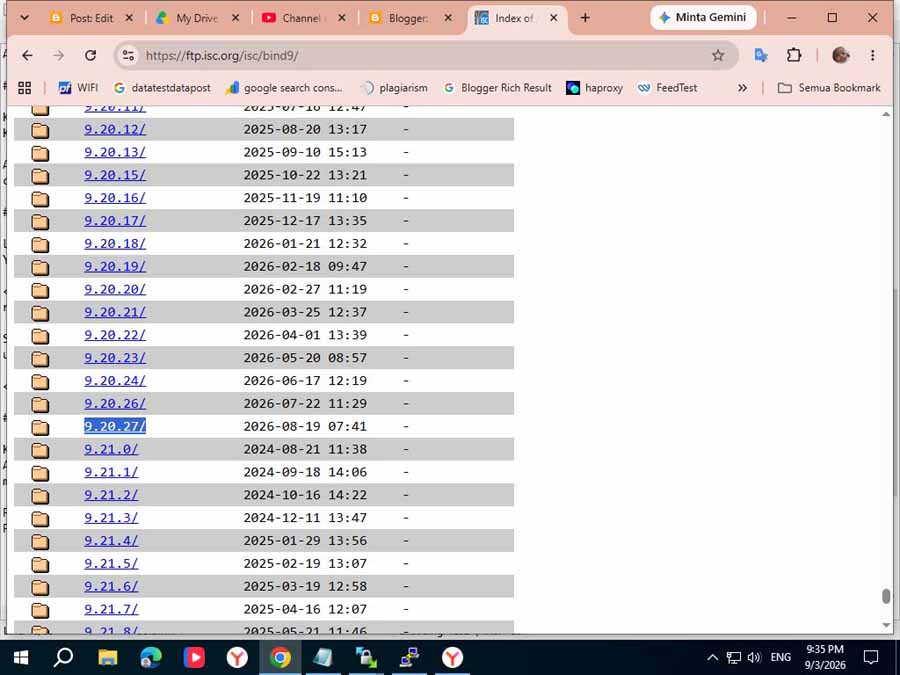
Lebih praktis, gunakan saja perintah wget. Biar bisa langsung di ekstark dari server Debian.
root@ns1:~# cd /home
root@ns1:/home# wget https://ftp.isc.org/isc/bind9/9.20.27/bind-9.20.27.tar.xz
Instal Bind Dengan Source Code
Untuk dapat mengkompilasi DNS Bind dengan source code, langkah pertama yang harus anda lakukan adalah memiliki file master bind9 tersebut. File master bind9 danapat anda unduh pada sebsit resmi ISC. Sebelum Anda dapat melakukan kompilasi dan membangun semuanya, Anda memerlukan kompiler C. Hampir setiap versi Linux menyertakan gcc kompiler C dari GNU yang dapat digunakan dengan baik.
Dalam hal ini anda telah menginstal GCC yang terapat dalam paket build-essential yang telah anda install pada bagian atas. Jadi,
kita lanjutkan saja dengan mengekstrak file bind-9.20.27.tar.xz.
root@doh:/home# tar -xvf bind-9.20.27.tar.xz
Folder baru bind-9.20.27 akan muncul di folder /home. Setelah itu anda bisa langsung mengkompilasi/menginstal.
Tapi sebelumnya, jalankan perintah ./configure --help, untuk melihat opsi atau flags apa saja yang ada untuk digunakan selama proses kompilasi.
root@doh:/home# cd bind-9.20.27
root@doh:/home/bind-9.20.27# ./configure --help
'configure' configures BIND 9.20.27 to adapt to many kinds of systems.

Usage: ./configure [OPTION]... [VAR=VALUE]...

To assign environment variables (e.g., CC, CFLAGS...), specify them as
VAR=VALUE.  See below for descriptions of some of the useful variables.

Defaults for the options are specified in brackets.

Configuration:
  -h, --help              display this help and exit
      --help=short        display options specific to this package
      --help=recursive    display the short help of all the included packages
  -V, --version           display version information and exit
  -q, --quiet, --silent   do not print 'checking ...' messages
      --cache-file=FILE   cache test results in FILE [disabled]
  -C, --config-cache      alias for '--cache-file=config.cache'
  -n, --no-create         do not create output files
      --srcdir=DIR        find the sources in DIR [configure dir or '..']

Installation directories:
  --prefix=PREFIX         install architecture-independent files in PREFIX
                          [/usr/local]
  --exec-prefix=EPREFIX   install architecture-dependent files in EPREFIX
                          [PREFIX]

By default, 'make install' will install all the files in
'/usr/local/bin', '/usr/local/lib' etc.  You can specify
an installation prefix other than '/usr/local' using '--prefix',
for instance '--prefix=$HOME'.

For better control, use the options below.

Fine tuning of the installation directories:
  --bindir=DIR            user executables [EPREFIX/bin]
  --sbindir=DIR           system admin executables [EPREFIX/sbin]
  --libexecdir=DIR        program executables [EPREFIX/libexec]
  --sysconfdir=DIR        read-only single-machine data [PREFIX/etc]
  --sharedstatedir=DIR    modifiable architecture-independent data [PREFIX/com]
  --localstatedir=DIR     modifiable single-machine data [PREFIX/var]
  --runstatedir=DIR       modifiable per-process data [LOCALSTATEDIR/run]
  --libdir=DIR            object code libraries [EPREFIX/lib]
  --includedir=DIR        C header files [PREFIX/include]
  --oldincludedir=DIR     C header files for non-gcc [/usr/include]
  --datarootdir=DIR       read-only arch.-independent data root [PREFIX/share]
  --datadir=DIR           read-only architecture-independent data [DATAROOTDIR]
  --infodir=DIR           info documentation [DATAROOTDIR/info]
  --localedir=DIR         locale-dependent data [DATAROOTDIR/locale]
  --mandir=DIR            man documentation [DATAROOTDIR/man]
  --docdir=DIR            documentation root [DATAROOTDIR/doc/bind]
  --htmldir=DIR           html documentation [DOCDIR]
  --dvidir=DIR            dvi documentation [DOCDIR]
  --pdfdir=DIR            pdf documentation [DOCDIR]
  --psdir=DIR             ps documentation [DOCDIR]

Program names:
  --program-prefix=PREFIX            prepend PREFIX to installed program names
  --program-suffix=SUFFIX            append SUFFIX to installed program names
  --program-transform-name=PROGRAM   run sed PROGRAM on installed program names

System types:
  --build=BUILD     configure for building on BUILD [guessed]
  --host=HOST       cross-compile to build programs to run on HOST [BUILD]
  --target=TARGET   configure for building compilers for TARGET [HOST]

Optional Features:
  --disable-option-checking  ignore unrecognized --enable/--with options
  --disable-FEATURE       do not include FEATURE (same as --enable-FEATURE=no)
  --enable-FEATURE[=ARG]  include FEATURE [ARG=yes]
  --enable-silent-rules   less verbose build output (undo: "make V=1")
  --disable-silent-rules  verbose build output (undo: "make V=0")
  --disable-maintainer-mode
                          disable make rules and dependencies not useful (and
                          sometimes confusing) to the casual installer
  --enable-dependency-tracking
                          do not reject slow dependency extractors
  --disable-dependency-tracking
                          speeds up one-time build
  --disable-largefile     omit support for large files
  --enable-static[=PKGS]  build static libraries [default=no]
  --enable-pic[=PKGS]     try to use only PIC/non-PIC objects [default=use
                          both]
  --enable-shared[=PKGS]  build shared libraries [default=yes]
  --enable-fast-install[=PKGS]
                          optimize for fast installation [default=yes]
  --enable-aix-soname=aix|svr4|both
                          shared library versioning (aka "SONAME") variant to
                          provide on AIX, [default=aix].
  --disable-libtool-lock  avoid locking (might break parallel builds)
  --enable-developer      enable developer build settings
  --enable-warn-error     turn on -Werror when compiling
  --enable-fuzzing=<afl|libfuzzer|ossfuzz>
                          Enable fuzzing using American Fuzzy Lop or libFuzzer
                          (default=no)
  --disable-geoip         support GeoIP2 geolocation ACLs if available
                          [default=yes]
  --disable-doh           disable DNS over HTTPS, removes dependency on
                          libnghttp2 (default is --enable-doh)
  --enable-pthread-rwlock use pthread rwlock instead of internal rwlock
                          implementation
  --enable-fips-mode      enable FIPS mode in OpenSSL library [default=no]
  --disable-tcp-fastopen  disable TCP Fast Open support [default=yes]
  --disable-chroot        disable chroot
  --enable-fixed-rrset    enable fixed rrset ordering [default=no]
  --enable-dnstap         enable dnstap support (requires fstrm, protobuf-c)
  --enable-leak-detection enable the memory leak detection in external
                          libraries (libxml2, libuv, OpenSSL) (disabled by
                          default)
  --enable-singletrace    enable single-query trace logging [default=no]
  --enable-querytrace     enable very verbose query trace logging [default=no]
  --enable-auto-validation
                          turn on DNSSEC validation by default, using the IANA
                          root key [default=yes]
  --enable-dnsrps-dl      DNS Response Policy Service delayed link
                          [default=yes]
  --enable-dnsrps         enable DNS Response Policy Service API
  --enable-tracing        enable User Statically Defined Tracing
  --enable-year2038       support timestamps after 2038
  --enable-full-report    report values of all configure options

Optional Packages:
  --with-PACKAGE[=ARG]    use PACKAGE [ARG=yes]
  --without-PACKAGE       do not use PACKAGE (same as --with-PACKAGE=no)
  --with-gnu-ld           assume the C compiler uses GNU ld [default=no]
  --with-sysroot[=DIR]    Search for dependent libraries within DIR (or the
                          compiler's sysroot if not specified).
  --with-liburcu=FLAVOR   Build with Userspace-RCU variant (developer-only
                          option) (membarrier|qsbr|mb|bp) [default=membarrier])
  --with-python-sys-prefix
                          use Python's sys.prefix and sys.exec_prefix values
  --with-python_prefix    override the default PYTHON_PREFIX
  --with-python_exec_prefix
                          override the default PYTHON_EXEC_PREFIX
  --with-maxminddb=PATH   Build with MaxMind GeoIP2 support (auto|yes|no|path)
                          [default=auto]
  --with-libnghttp2       build with libnghttp2 library [yes|no|auto] (default
                          is auto)
  --with-openssl=DIR      root of the OpenSSL directory
  --with-gssapi=PATH|[/path/]krb5-config
                          Specify path for system-supplied GSSAPI
                          [default=auto]
  --with-lmdb=[PATH]      use LMDB library [default=auto], optionally specify
                          the prefix for lmdb library
  --with-libxml2          build with libxml2 library [yes|no|auto] (default is
                          auto)
  --with-json-c           build with json-c library [yes|no|detect] (default
                          is detect)
  --with-zlib             build with zlib for HTTP compression [default=yes]
  --with-readline=yes|no|libedit|readline
                          specify readline library [default auto]
  --with-libidn2=PATH     enable IDN support using GNU libidn2
                          [yes|no(default)|path]
  --with-cmocka=detect    enable CMocka based tests (default is detect)
  --with-jemalloc=detect  enable jemalloc memory allocator (default is detect)
  --with-dnsrps-libname   DNSRPS provider library name (librpz.so)
  --with-dnsrps-dir       path to DNSRPS provider library
  --with-zonedb=detect    specify default zone database type (default is
                          "qpzone")
  --with-cachedb=detect   specify default cache database type (default is
                          "qpcache")

Some influential environment variables:
  CC          C compiler command
  CFLAGS      C compiler flags
  LDFLAGS     linker flags, e.g. -L<lib dir> if you have libraries in a
              nonstandard directory <lib dir>
  LIBS        libraries to pass to the linker, e.g. -l<library>
  CPPFLAGS    (Objective) C/C++ preprocessor flags, e.g. -I<include dir> if
              you have headers in a nonstandard directory <include dir>
  CPP         C preprocessor
  LT_SYS_LIBRARY_PATH
              User-defined run-time library search path.
  PKG_CONFIG  path to pkg-config utility
  PKG_CONFIG_PATH
              directories to add to pkg-config's search path
  PKG_CONFIG_LIBDIR
              path overriding pkg-config's built-in search path
  LIBURCU_CFLAGS
              C compiler flags for LIBURCU, overriding pkg-config
  LIBURCU_LIBS
              linker flags for LIBURCU, overriding pkg-config
  RCU_VERSION version of $RCU_FLAVOR, overriding pkg-config
  PYTHON      the Python interpreter
  MAXMINDDB_CFLAGS
              C compiler flags for MAXMINDDB, overriding pkg-config
  MAXMINDDB_LIBS
              linker flags for MAXMINDDB, overriding pkg-config
  MAXMINDDB_PREFIX
              value of prefix for libmaxminddb, overriding pkg-config
  LIBUV_CFLAGS
              C compiler flags for LIBUV, overriding pkg-config
  LIBUV_LIBS  linker flags for LIBUV, overriding pkg-config
  LIBUV_VERSION
              version of libuv, overriding pkg-config
  LIBNGHTTP2_CFLAGS
              C compiler flags for LIBNGHTTP2, overriding pkg-config
  LIBNGHTTP2_LIBS
              linker flags for LIBNGHTTP2, overriding pkg-config
  OPENSSL_CFLAGS
              C compiler flags for OPENSSL, overriding pkg-config
  OPENSSL_LIBS
              linker flags for OPENSSL, overriding pkg-config
  OPENSSL_VERSION
              version of openssl, overriding pkg-config
  LMDB_CFLAGS C compiler flags for LMDB, overriding pkg-config
  LMDB_LIBS   linker flags for LMDB, overriding pkg-config
  LIBXML2_CFLAGS
              C compiler flags for LIBXML2, overriding pkg-config
  LIBXML2_LIBS
              linker flags for LIBXML2, overriding pkg-config
  JSON_C_CFLAGS
              C compiler flags for JSON_C, overriding pkg-config
  JSON_C_LIBS linker flags for JSON_C, overriding pkg-config
  ZLIB_CFLAGS C compiler flags for ZLIB, overriding pkg-config
  ZLIB_LIBS   linker flags for ZLIB, overriding pkg-config
  READLINE_CFLAGS
              C compiler flags for READLINE, overriding pkg-config
  READLINE_LIBS
              linker flags for READLINE, overriding pkg-config
  LIBCAP_CFLAGS
              C compiler flags for LIBCAP, overriding pkg-config
  LIBCAP_LIBS linker flags for LIBCAP, overriding pkg-config
  DNSTAP_CFLAGS
              C compiler flags for DNSTAP, overriding pkg-config
  DNSTAP_LIBS linker flags for DNSTAP, overriding pkg-config
  SPHINX_BUILD
              path to sphinx-build binary used to build the documentation
  LIBIDN2_CFLAGS
              C compiler flags for LIBIDN2, overriding pkg-config
  LIBIDN2_LIBS
              linker flags for LIBIDN2, overriding pkg-config
  CMOCKA_CFLAGS
              C compiler flags for CMOCKA, overriding pkg-config
  CMOCKA_LIBS linker flags for CMOCKA, overriding pkg-config
  JEMALLOC_CFLAGS
              C compiler flags for JEMALLOC, overriding pkg-config
  JEMALLOC_LIBS
              linker flags for JEMALLOC, overriding pkg-config
  JEMALLOC_VERSION
              version of jemalloc, overriding pkg-config
  DTRACE      path to dtrace binary used to build User Statically Defined
              Tracing probes

Use these variables to override the choices made by 'configure' or to help
it to find libraries and programs with nonstandard names/locations.

Report bugs to <https://gitlab.isc.org/isc-projects/bind9/-/issues/new?issuable_template=Bug>.
BIND home page: <https://www.isc.org/downloads/>.
root@doh:/home/bind-9.20.27#
Ada banyak sekali pilihan/perintah, yang bisa anda gunakan. Gunakan yang perlu saja, jangan digunakan semuanya.
Biar lebih memudahkan pemahaman, kita mulai konfigurasi secara perlahan. Kita asumsikan DNS Bind9 akan kita tempatkan
di folder /usr/local (selama proses konfigurasi, perhatikan kesalahan error-nya).
Jalankan perintah ./configure --prefix=/usr/local.
root@doh:/home/bind-9.20.27# ./configure --prefix=/usr/local
checking build system type... x86_64-pc-linux-gnu
checking host system type... x86_64-pc-linux-gnu
checking whether C compiler accepts -fno-strict-aliasing... yes
checking whether C compiler accepts -Werror -fno-delete-null-pointer-checks... yes
checking whether C compiler accepts -fdiagnostics-show-option... yes
checking whether the linker accepts -Wl,--export-dynamic... yes
checking for pkg-config... no
configure: error: The pkg-config script could not be found or is too old.
root@doh:/home/bind-9.20.27#
Lihat kesalahannya, perhatikan scipt warna Hijau. Script tersebut mengartikan bahwa dependensi pkg-config belum tersedia atau
belum di install. Solusinya, anda harus menginstal pkg-config.
root@doh:/home/bind-9.20.27# apt-get install pkg-config pkgconf
Setelah itu, anda jalankan lagi perintah ./configure --prefix=/usr/local, Lihat kesalahannya.
root@doh:/home/bind-9.20.27# ./configure --prefix=/usr/local
checking build system type... x86_64-pc-linux-gnu
checking host system type... x86_64-pc-linux-gnu
checking for pkg-config... /usr/bin/pkg-config
checking pkg-config is at least version 0.9.0... yes
checking liburcu flavor... liburcu
checking for liburcu >= 0.13.0 liburcu-cds >= 0.13.0... no
checking for liburcu >= 0.10.0 liburcu-cds >= 0.10.0... no
configure: error: Package requirements (liburcu >= 0.10.0 liburcu-cds >= 0.10.0) were not met:

Package 'liburcu', required by 'virtual:world', not found
Package 'liburcu-cds', required by 'virtual:world', not found

Consider adjusting the PKG_CONFIG_PATH environment variable if you
installed software in a non-standard prefix.

Alternatively, you may set the environment variables LIBURCU_CFLAGS
and LIBURCU_LIBS to avoid the need to call pkg-config.
See the pkg-config man page for more details.
root@doh:/home/bind-9.20.27#
Kesalahan pkg-config telah teratasi, namun muncul lagi kesalahan liburcu dan liburcu-cds. Solusinya anda install
dependensi liburcu.
root@doh:/home/bind-9.20.27# apt-get install liburcu-dev -y
Jalankan lagi perintah ./configure --prefix=/usr/local, Lihat kesalahannya lagi.
root@doh:/home/bind-9.20.27# ./configure --prefix=/usr/local
checking build system type... x86_64-pc-linux-gnu
checking host system type... x86_64-pc-linux-gnu
checking target system type... x86_64-pc-linux-gnu
checking for pthread_yield_np... no
checking for pthread_setname_np... yes
checking for pthread_set_name_np... no
checking for pthread_np.h... no
checking for libuv >= 1.37.0... no
checking for libuv >= 1.34.0 libuv < 1.35.0... no
configure: error: libuv >= 1.34.0 (except 1.35.0 and 1.36.0) not found
root@doh:/home/bind-9.20.27#
Perhatikan script warna Hijau, ternyata DNS Bind9 membutuhkan dependensi libuv. Install dependensi tersebut, dengan perintah di bawah ini.
root@doh:/home/bind-9.20.27# apt-get install libuv1-dev libuvc-dev -y
Memang sangat membosankan, tapi seperti inilah jika menginstall aplikasi dengan source code. Banyak sekali kesalahannya, karena
banyak dependensi yang tidak kita ketahui. Kita lanjutkan lagi dengan perintah ./configure --prefix=/usr/local.
root@doh:/home/bind-9.20.27# ./configure --prefix=/usr/local
checking build system type... x86_64-pc-linux-gnu
checking host system type... x86_64-pc-linux-gnu
checking whether UV_UDP_MMSG_FREE is declared... yes
checking whether UV_UDP_MMSG_CHUNK is declared... yes
checking whether struct msghdr uses padding for alignment... no
checking whether UV_UDP_RECVMMSG is declared... yes
checking whether UV_UDP_LINUX_RECVERR is declared... yes
checking for libnghttp2 >= 1.6.0... no
configure: error: DNS-over-HTTPS support requested, but libnghttp2 not found. Either install libnghttp2 or use --disable-doh.
root@doh:/home/bind-9.20.27#
Oh…!!! ternyata Bind9 butuh dependensi libnghttp2 untuk mengaktifkan fitur DNS Over HTTPS - DOH.
Agar kesalahan tersebut bisa segera teratasi, install dependensi libnghttp2.
root@doh:/home/bind-9.20.27# apt-get install libnghttp2-dev libngtcp2-dev
Lanjutkan dengan menjalankan perintah ./configure --prefix=/usr/local, lagi. Masihkan ada yang kurang dependensinya.
root@doh:/home/bind-9.20.27# ./configure --prefix=/usr/local
checking build system type... x86_64-pc-linux-gnu
checking for include/openssl/ssl.h in /usr/local/ssl... no
checking for include/openssl/ssl.h in /usr/lib/ssl... no
checking for include/openssl/ssl.h in /usr/ssl... no
checking for include/openssl/ssl.h in /usr/pkg... no
checking for include/openssl/ssl.h in /usr/local... no
checking for include/openssl/ssl.h in /usr... no
checking whether compiling and linking against OpenSSL works... no
configure: error: in '/home/bind-9.20.27':
configure: error: OpenSSL/LibreSSL not found
See 'config.log' for more details
root@doh:/home/bind-9.20.27#
Oh…!!! ternyata Bind9 juga butuh library OpenSSL. Kita install libarry OpenSSL tersebut dengan perintah berikut ini.
root@doh:/home/bind-9.20.27# apt-get install openssl libssl-dev libssl3 python3
Jalankan lagi perintah ./configure --prefix=/usr/local, masihkah ada library yang kurang.
root@doh:/home/bind-9.20.27# ./configure --prefix=/usr/local
checking build system type... x86_64-pc-linux-gnu
Package 'libcap', required by 'virtual:world', not found

Consider adjusting the PKG_CONFIG_PATH environment variable if you
installed software in a non-standard prefix.

Alternatively, you may set the environment variables LIBCAP_CFLAGS
and LIBCAP_LIBS to avoid the need to call pkg-config.
See the pkg-config man page for more details.
root@doh:/home/bind-9.20.27#
Saat ini, library libcap yang dibutuhkan Bind9, segera install library/dependnesi libcap tersebut.
root@ns1:/var/www/html/unixbsdshell# apt-get install libcap-dev libcap2
Yo.. Ayo… jalankan lagi perintah ./configure --prefix=/usr/local, masihkah ada library yang kurang.
root@doh:/home/bind-9.20.27# ./configure --prefix=/usr/local
checking build system type... x86_64-pc-linux-gnu
checking host system type... x86_64-pc-linux-gnu
config.status: creating util/check-make-install.sh
config.status: creating config.h
config.status: config.h is unchanged
config.status: executing depfiles commands
config.status: executing libtool commands
===============================================================================
Configuration summary:
-------------------------------------------------------------------------------
Optional features enabled:
    DNSSEC validation active by default (--enable-auto-validation)
-------------------------------------------------------------------------------
    Library versions:
      OpenSSL:          3.5.7
      libuv:            1.50.0
      Userspace-RCU:    0.15.2
-------------------------------------------------------------------------------
Features disabled or unavailable on this platform:
    Memory allocator: system

    +------------------------------------------+
    |             ==== WARNING ====            |
    |                                          |
    | This is NOT a recommended configuration. |
    | Using the system memory allocator causes |
    | reduced performance and increased memory |
    | fragmentation. Installing the jemalloc   |
    | memory allocator (version >= 4.0.0) is   |
    | strongly recommended.                    |
    +------------------------------------------+

    Allow 'dnstap' packet logging (--enable-dnstap)
    GeoIP2 access control (--enable-geoip)
    GSS-API (--with-gssapi)
    DNS Response Policy Service interface (--enable-dnsrps)
    Allow 'fixed' rrset-order (--enable-fixed-rrset)
    FIPS mode in OpenSSL (--enable-fips-mode)
    Very verbose query trace logging (--enable-querytrace)
    Single-query trace logging (--enable-singletrace)
    CMocka Unit Testing Framework (--with-cmocka)
    XML statistics (--with-libxml2)
    JSON statistics (--with-json-c)
    HTTP zlib compression (--with-zlib)
    LMDB database to store configuration for 'addzone' zones (--with-lmdb)
    IDN support (--with-libidn2)
-------------------------------------------------------------------------------
Configured paths:
    prefix: /usr/local
    sysconfdir: ${prefix}/etc
    localstatedir: ${prefix}/var
-------------------------------------------------------------------------------
Compiler: gcc
    gcc (Debian 14.2.0-19) 14.2.0
    Copyright (C) 2024 Free Software Foundation, Inc.
    This is free software; see the source for copying conditions.  There is NO
    warranty; not even for MERCHANTABILITY or FITNESS FOR A PARTICULAR PURPOSE.

CFLAGS: -Wall -Wextra -Wwrite-strings -Wpointer-arith -Wno-missing-field-initializers -Wformat -Wshadow -Werror=implicit-function-declaration -Werror=missing-prototypes -Werror=format-security -Werror=parentheses -Werror=implicit -Werror=strict-prototypes -Werror=vla -fno-strict-aliasing -fno-delete-null-pointer-checks -fdiagnostics-show-option -g -O2 -I/usr/include/x86_64-linux-gnu  -pthread
CPPFLAGS: -U_FORTIFY_SOURCE -D_FORTIFY_SOURCE=2
LDFLAGS:
-------------------------------------------------------------------------------
For more detail, use --enable-full-report.
===============================================================================
root@doh:/home/bind-9.20.27#
Bila tak ada dependensi/library yang kurang tampilan seperti di atas. Itu artinya semua dependensi telah tersedia.
Setelah tak ada kesalahan lagi, anda bisa langsung menjalankan perintah maka dan make install.
root@doh:/home/bind-9.20.27# make && make install
Selamat…!!!. Sampai sini, anda telah berhasil menginstall Bind9 dengan Source Code.
C. Lengkapi perintah Configure
Perintah configure diatas masih tergolong sangat sederhana, anda dapat melengkapinya dengan opsi/flags lainnya,
seperti contoh di bawah ini.
./configure --prefix=/usr/local --sbindir=/usr/local/sbin --disable-fips-mode \
--bindir=/usr/local/bin --libdir=/usr/local/lib --includedir=/usr/local/include \
--runstatedir=/var/run/named --localstatedir=/usr/local/var/named \
--enable-developer --enable-geoip --enable-doh --sysconfdir=/usr/local/etc/namedb \
--enable-fixed-rrset --enable-dnstap --enable-leak-detection --enable-singletrace \
--enable-querytrace --enable-auto-validation --enable-dnsrps --enable-year2038 \
--enable-full-report --with-liburcu=membarrier --with-maxminddb=yes --with-libnghttp2=yes \
--with-openssl=/usr/lib,/usr/include --with-readline=readline --with-libidn2=yes --with-cmocka=detect \
--with-jemalloc --with-dnsrps-libname --with-dnsrps-dir --with-json-c=yes \
--mandir=/usr/local/share/man --with-gssapi=auto --with-zonedb=rbtdb --with-cachedb=qpdb  \
--with-python-sys-prefix --with-python_prefix --disable-tracing \
--enable-pthread-rwlock WITH_DEBUG=1 \
LIBURCU_CFLAGS="-I/usr/include" LIBURCU_LIBS="-L/usr/lib -lurcu-common -lurcu -lurcu-memb -lurcu-cds" \
PKG_CONFIG_PATH="/usr/lib/x86_64-linux-gnu/pkgconfig" \
LIBIDN2_CFLAGS="-I/usr/include" \
LIBIDN2_LIBS="-L/usr/lib -liconv -lidn2 -R/usr/lib -L/usr/lib -lunistring -R/usr/local/lib" \
DTRACE="/usr/lib/dtrace /usr/src/usr.bin /usr/bin /usr/src/share/dtrace" \
LMDB_CFLAGS="-I/usr/include" LMDB_LIBS="-L/usr/lib -llmdb"
root@doh:/home/bind-9.20.27# make && make install
Untuk menjalankan perintah configure lengkap seperti contoh di atas, anda membutuhkan dependensi, sebagai berikut.
apt-get install libmaxminddb0 libmaxminddb-dev
apt-get install libjson-c-dev
apt-get install zlib1g zlib1g-dev
apt-get install libreadline-dev
apt-get install fstrm-bin libfstrm-dev libfstrm0
apt-get install libprotobuf-c-dev libprotobuf-c1 protobuf-c-compiler protobuf-compiler libprotobuf-dev
apt-get install libidn2-0 libidn2-0-dev libidn2-dev
apt-get install libdmalloc-dev libdmalloc5 libjemalloc-dev libjemalloc2
apt-get install cmocka-doc libcmocka-dev libcmocka0
apt-get install liblmdb++-dev liblmdb-dev liblmdb0 lmdb-doc lmdb-utils
apt-get install krb5-k5tls krb5-kdc krb5-locales krb5-multidev libgssapi-krb5-2 libkrb5-dev libkrb5-3
apt-get install libsasl2-2 libsasl2-dev libsasl2-modules libsasl2-modules-db libsasl2-modules-gssapi-mit
Anda dapat mengubah perintah configure sesuka hati anda. Yang perlu anda perhatikan kebutuhan akan penggunaan aplikasi
dan dependensi yang tersedia. Dengan menginstall aplikasi dengan source code, kita dapat meningkatkan kemampuan aplikasi tersebut.
Berbeda dengan menginstall dengan paket APT, yang paket kompilasinya telah ditentukan oleh pengembang. Anda hanya mgnkonfigurasi dan menjalankannya saja.